
API Integration
All Tasks created in your Rightbrain dash are powered by an auto scaling API that can be easily integrated into any external system. They are composable by default.
You can run any Task within the dash through a no-code interface to iterate until you are happy with the quality of the output.
Once ready to integrate the Task into another platform or to test out the Task API, just click the Integrate button from the Task’s Run page to open the guide.
From there, you can:
1. Choose your authentication method
Choose API Key or OAuth 2.0 Client for the requests. See the Authentication guide for details.
2. Preview your API call
Rightbrain automatically generates a complete curl request for your selected Task, including:
- The correct endpoint for your organisation and project
- Pre-filled
task_inputparameters from your most recent run - Your chosen authentication token
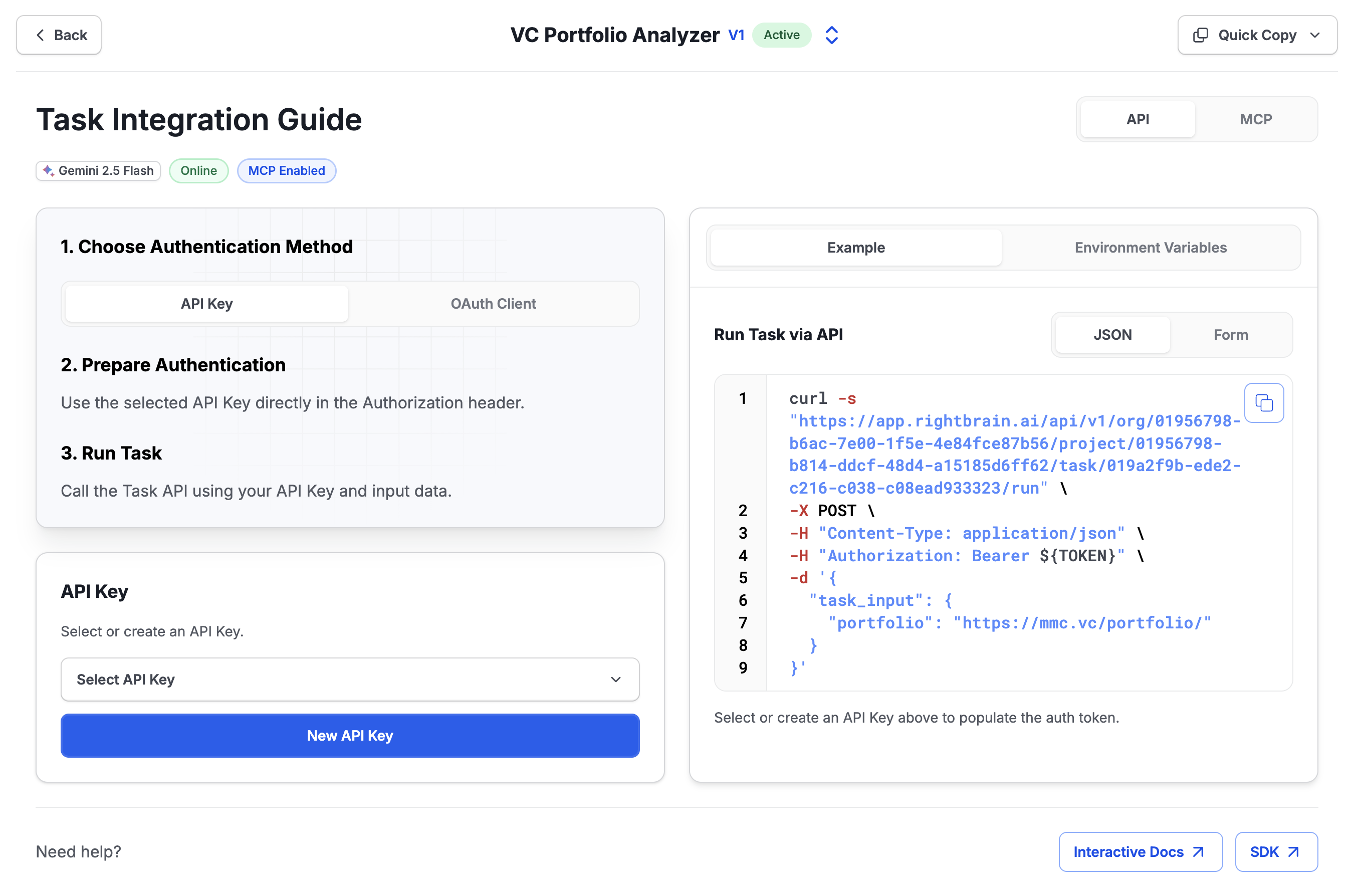
3. Run your Task
Copy the generated request and run it in your terminal, IDE or drop it into any external platform that supports REST API integrations.
4. Interactive Docs
Another option is to paste your API Key into the interactive API Reference to call endpoints directly in your browser. Every API endpoint is documented in this section and supports the build out of complex applications based on the Rightbrain stack.